Best Practices for Enterprise Salesforce Data Migration
The Lifeblood of Your CRM: Securing Your Data
A CRM devoid of accurate data is functionally useless. Transitioning from legacy servers, disparate spreadsheets, or an older CRM requires absolute precision. Even minor mapping errors during a salesforce implementation can derail user adoption entirely.
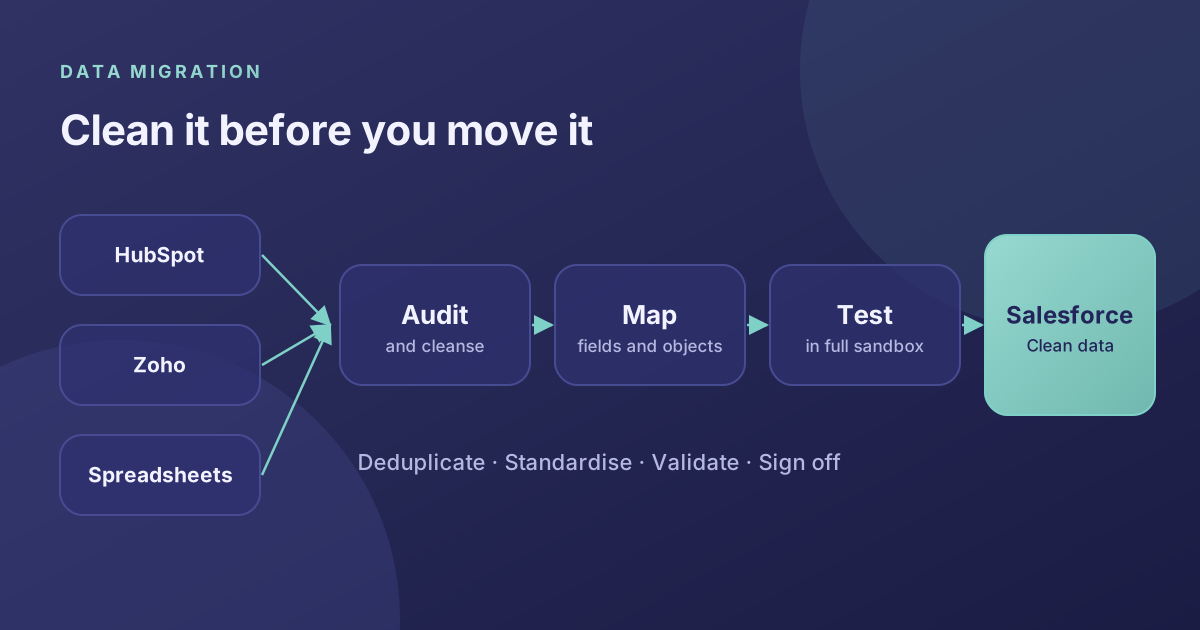
Step 1: The Data Audit and Cleansing Phase
Never migrate bad data into a new system. If you attempt to migrate thousands of duplicate or outdated records, your new Salesforce instance instantly inherits the problems of the old one.
- Remove inactive accounts and aggressively purge duplicate contacts.
- Standardize complex data formats (e.g., ensuring all phone numbers use international exact formatting).
- Archive closed-won data that is older than 5 years to lower platform data storage costs.
Step 2: Complex Mapping and Architecture Setup
Successful extraction begins by meticulously mapping historical fields to the new Salesforce architecture. This relies heavily on proper Org customization prior to migration. If you have unique tracking metrics in a legacy system, custom objects and fields must be built to catch that incoming data seamlessly.
Step 3: Sandbox Testing and Final Deployment
Once the mapping is approved, we execute test batches into a Full Copy Sandbox. This allows key stakeholders to validate that legacy accounts render exactly as expected.
Following approval, the final data load is typically executed during the weekend. This strategic downtime protects end-users and completely mitigates data corruption caused by simultaneous live edits.
Protect Your Data Integrity
Don't risk your organization's most valuable asset. Data migration requires technical mastery and algorithmic precision.
Contact Alu Cloud Consulting today to learn how our integration architects guarantee a seamless and secure transition into the Salesforce platform.
Ready to talk about your Salesforce project?
Every engagement starts with a free discovery call. No pressure, just an honest conversation about where you are and what you are trying to build.
Frequently Asked Questions
Will our system experience downtime during migration?
We execute major data loads during weekends or low-traffic periods to ensure absolutely zero operational downtime for your daily business activities.
How do you handle duplicate records?
We utilize advanced algorithmic deduplication tools to merge records based on fuzzy matching logic against emails, domain names, and phone numbers before the final import.
What happens if data fails to migrate?
Our strategy includes partial test migrations in a full-copy Sandbox. If a record fails, it is flagged in our error logs, reviewed, corrected, and mapped properly.
How far back should we migrate historical data?
We generally advise only bringing over closed-won deals from the last 2-3 years and active pipelines. Older legacy data can be warehoused externally to keep your new Org fast and clean.
Can you migrate data from custom legacy databases?
Yes, provided your legacy database can export into CSV/JSON or has an accessible API, we can orchestrate a direct ETL (Extract, Transform, Load) pipeline into Salesforce.