Salesforce for Small Business: What You Actually Need and What You Can Skip
The Small Business Salesforce Problem
Salesforce is built to scale to enterprises with thousands of users. When a 15-person company tries to implement everything at once, they usually end up with a system that is more complicated than the problem it is solving. The reps stop using it, the admin stops maintaining it, and six months later someone suggests going back to spreadsheets.
The goal for a small business Salesforce implementation is not completeness. It is usefulness on day one, with room to grow.
Which Edition Is Right for a Small Team?
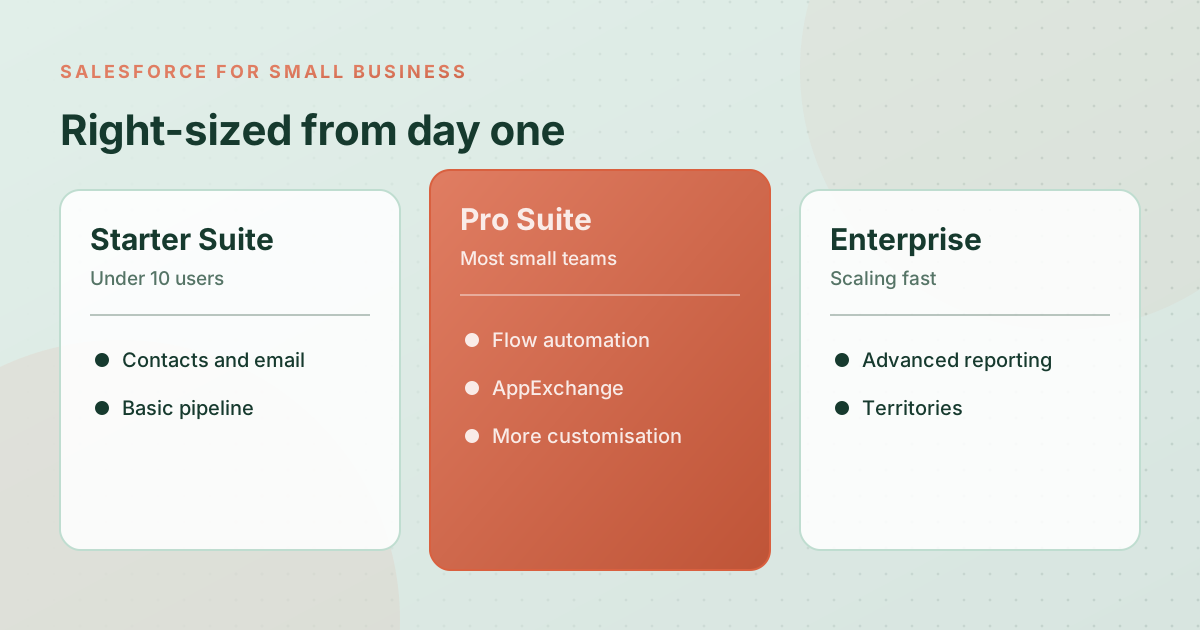
Most small businesses should start with Sales Cloud Pro Suite or Enterprise:
- Starter Suite: Good if you have under 10 users and mainly need contact management, email tracking, and basic pipeline visibility. Limited customization and no API access.
- Pro Suite: The right choice for most growing small businesses. Includes Flow automation, AppExchange access, and more customization. Covers 95% of what a team under 50 people needs.
- Enterprise: When you need advanced reporting, territory management, or specific features like Opportunity Splits. Worth the extra cost if you are scaling fast or have complex territories.
Avoid buying more licenses than you currently need. You can always add seats. Starting with 20 licenses when you have 8 reps is unnecessary budget spent on unused access.
What to Set Up First
For a small business, the sequence matters. Do these in order:
- Clean up and import your existing contacts and accounts: Start with a clean data set. This means deduplicating your existing contact list before you import anything. A CRM full of duplicates is worse than no CRM.
- Configure your pipeline stages: Map your actual sales process into opportunity stages. Keep it simple: 4 to 6 stages that reflect the real steps a deal goes through. Do not add stages for things that do not happen consistently.
- Set up lead sources: Track where leads come from. Website, referral, outbound, event. This data becomes valuable fast once you start closing deals and want to know which source produces the best customers.
- Build two or three core automations: Lead assignment when a new lead comes in. A follow-up task created when an opportunity is moved to a certain stage. An alert when a deal has had no activity for 10 days. These three automations alone will recover meaningful time each week.
- Create a simple manager dashboard: Pipeline by stage, deals closing this month, and leads by source. Build this before go-live so the team sees value immediately.
What Small Businesses Should Skip at the Start
This list is as important as the setup list:
- Forecasting categories: Omit/Best Case/Commit/Pipeline is a forecasting model designed for larger sales teams with layered management. For a small team, pipeline stage is enough.
- Territory management: Unless you have geographic or vertical-based territory splits today, this feature adds complexity without benefit for small teams.
- Custom Apex code: Almost nothing a small business needs in Salesforce requires custom code. Flow handles 95% of automation requirements without a developer. Build with clicks first.
- Too many required fields: Every required field creates friction. Start with the minimum fields you genuinely need to run your business, and add more only when you have data showing the gaps.
- Complex approval processes: Save multi-step approvals for when your business actually requires them. For most small businesses, a manager can just be tagged in a Chatter post.
The Biggest Mistake Small Businesses Make
The most common mistake we see is trying to configure Salesforce to perfectly mirror an existing process that was not working well in the first place. If your current sales process is chaotic, implementing Salesforce to mimic that chaos just creates an expensive chaotic system.
Use the implementation as an opportunity to simplify. If you cannot describe your pipeline in 6 stages or fewer, that is a process problem, not a configuration problem. Fix the process first, then build the system around it.
What Good Looks Like at 90 Days
At 90 days post-launch, a well-implemented small business Salesforce org should have every rep logging in daily, a manager who can answer "what closed this month" in under two minutes without asking anyone, and at least one automation running that saves meaningful time each week. That is the baseline. Everything else is incremental improvement from there.
If you are a small business considering Salesforce and want to understand what a realistic, right-sized implementation looks like for your team, we offer a free 45-minute discovery call where we will tell you honestly what you need and what you do not.
Ready to talk about your Salesforce project?
Every engagement starts with a free discovery call. No pressure, just an honest conversation about where you are and what you are trying to build.
Frequently Asked Questions
Is Salesforce too expensive for small businesses?
It depends on what you compare it to. The cost of lost deals, slow follow-ups, and missed pipeline visibility can easily exceed the subscription cost. Sales Cloud Pro Suite at around $100 per user per month is a reasonable investment for a team that is serious about their sales process.
Which Salesforce edition is best for a small team?
Pro Suite handles the needs of most small businesses under 50 people. It includes Flow automation, AppExchange access, and enough customization for a clean implementation. Starter Suite works for very early-stage teams but limits customization significantly.
Can a small business implement Salesforce without a consultant?
Yes, for a simple scope. If you have someone on your team with Salesforce Administrator certification and the time to dedicate to it, a small team implementation is manageable internally. The risk is building something that works for today but creates technical debt that limits you later.
What should a small business avoid in Salesforce?
Custom Apex code for anything a Flow can handle. More required fields than the team will actually fill out. Forecasting features designed for enterprise sales management. Territory management before you have actual territory splits. The goal is a simple, clean system the team actually uses.
How do we measure if our Salesforce implementation was successful?
Three simple measures: daily active logins above 80%, a manager who can answer pipeline questions without asking a rep, and at least one automation running that saves the team time each week. If all three are true at 90 days, the implementation is working.