
Realistic Salesforce Implementation Timelines by Project Type
The Two-Week Promise
If a consulting firm tells you they can fully implement Salesforce in two weeks, ask what specifically is included. Sometimes that is a legitimate answer for a very narrow scope: a small team, no integrations, no data migration, and minimal customization. More often, it is a low-number to win the deal, and the timeline doubles once the project actually starts.
This guide is about honest timelines. What actually takes the time it takes, and why.
The Three Main Categories of Implementation
Before we get into numbers, it helps to categorize the work:
- Starter implementations: Sales Cloud with standard objects, minimal customization, no integrations, small team (under 15 users), no significant data migration.
- Mid-market implementations: Sales Cloud with custom objects and fields, 2 to 3 integrations, a data migration from an existing CRM or spreadsheets, 15 to 100 users.
- Enterprise implementations: Multiple clouds (Sales, Service, Marketing), complex data model, 3+ integrations including ERP systems, large data migration, 100+ users, complex security model.
Realistic Timelines
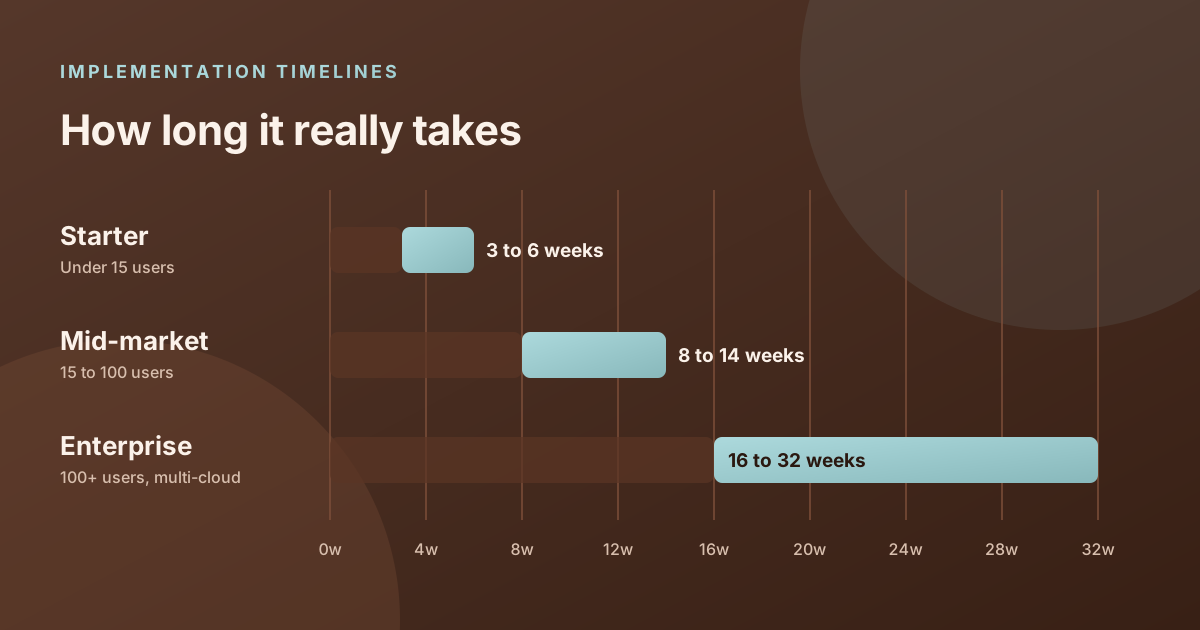
- Starter implementation: 3 to 6 weeks. This assumes requirements are clear, decisions are made quickly, and someone on the client side is available to review and approve work. The main risk at this size is scope creep. A "simple" implementation has a way of growing as people start seeing the system take shape and want to add things.
- Mid-market implementation: 8 to 14 weeks. The integrations and data migration are what extend this timeline. A single integration to a marketing automation platform might add 2 weeks on its own. Data migration with deduplication work adds another 2 to 3 weeks of back-and-forth between the source system and the new Salesforce org.
- Enterprise implementation: 16 to 32 weeks. Multi-cloud implementations are complex. The coordination between Sales Cloud, Service Cloud, and Account Engagement alone requires careful architecture to avoid data conflicts. Add an ERP integration, a large data migration, and 150 users across multiple regions, and you have a meaningful project that deserves the time it takes.
What Actually Drives Timeline
In our experience, the biggest timeline drivers are almost never technical:
- Decision speed: The number one cause of project delays is slow decisions on the client side. When an architecture question gets sent to a steering committee that meets monthly, that is a month of delay. Projects move at the speed of the client's ability to review and decide.
- Data quality: The worse the source data, the longer the migration takes. We have seen data migrations that were scoped at 2 weeks turn into 6 weeks because the source data had structural problems nobody knew about until we started looking at it.
- Scope clarity: Projects that start with a clear, documented scope almost always deliver on time. Projects that start with "we will figure out the details as we go" almost always run over.
- Stakeholder availability: The business SMEs who need to validate requirements and review UAT output are typically the people with the least available time. When they are not available for scheduled reviews, everything downstream shifts.
- Integration complexity: Integrations with legacy systems, especially on-premise ERP systems with limited API documentation, can take significantly longer than estimated. These are also the areas where surprises tend to surface late in a project.
Phases That Cannot Be Rushed
Two phases deserve specific attention:
Discovery and requirements: The temptation is to shorten this phase to get into configuration faster. This is almost always a mistake. Time spent in requirements prevents weeks of rework later. A week spent documenting your pipeline stages, security model, and integration requirements is a week that prevents three weeks of fixes after something is built wrong.
User acceptance testing: UAT requires real users testing real scenarios with real data. It cannot be done in a day. Give it at least a week for a mid-market project, two weeks for enterprise. The goal is to find the problems before go-live, not after.
Red Flags in a Timeline Proposal
- No discovery phase in the timeline, or discovery scheduled for less than one week on a mid-market project.
- Testing is not a named phase with a defined duration.
- Training is listed as a single day for the entire organization.
- Data migration is described without a testing step in a sandbox environment first.
- No hypercare or post-launch support period.
Setting Yourself Up for On-Time Delivery
The clients whose projects finish on time share a few characteristics: they have a named internal project owner who makes decisions, they respond to review requests within 24 to 48 hours, they keep the scope to what was agreed, and they bring their actual end users into UAT rather than having IT sign off on everything.
If you are planning a Salesforce implementation and want to understand what a realistic timeline looks like for your specific situation, our team offers a free scoping session where we will give you a timeline estimate and walk through what will drive that number.
Ready to talk about your Salesforce project?
Every engagement starts with a free discovery call. No pressure, just an honest conversation about where you are and what you are trying to build.
Frequently Asked Questions
How long does a basic Salesforce implementation take?
A starter implementation for a small team with minimal customization and no integrations typically takes 3 to 6 weeks. The timeline extends when integrations, data migrations, or larger user counts are added.
What is the biggest cause of implementation delays?
Slow decisions on the client side. When reviews take days instead of hours and approvals require committee meetings, every phase of the project stretches. Projects move at the speed of the client team's ability to respond and decide.
Can you do a Salesforce implementation in two weeks?
A very narrow scope, maybe. A small team, no integrations, no data migration, standard pipeline stages. But if someone promises a two-week enterprise implementation with integrations, that timeline will almost certainly expand once the project starts. Ask specifically what is and is not included.
How long does a data migration typically take?
For a mid-market project, plan 2 to 4 weeks for data migration including audit, cleansing, field mapping, sandbox testing, and final load. If the source data is messy or comes from multiple systems, add more time. Poor data quality is the most common source of migration delays.
What is a hypercare period?
Hypercare is an intensive support period immediately after go-live, typically 2 to 4 weeks, where the consulting team is highly available to resolve issues as real users encounter them in the live system. It bridges the gap between launch and normal support operations.