
How a SaaS Company Cut Lead Response Time by 68%
Results the Client Measured
68% faster
Lead response time
From an average of 4.2 hours to under 80 minutes
100%
Pipeline visibility
All 18 reps on one structured pipeline for the first time
Cut by 90%
Finance reconciliation
A real-time sync replaced a three-day manual process
Down 40%
Rep onboarding time
Guided selling paths replaced informal handovers
What the Client Was Facing
Leads lived in spreadsheets, a free HubSpot account and a shared inbox. As the sales team grew from 5 to 18 reps, deals slipped because nobody owned new leads, pipeline stages meant different things to different people, and finance only found out about closed deals when someone emailed them.
What We Delivered
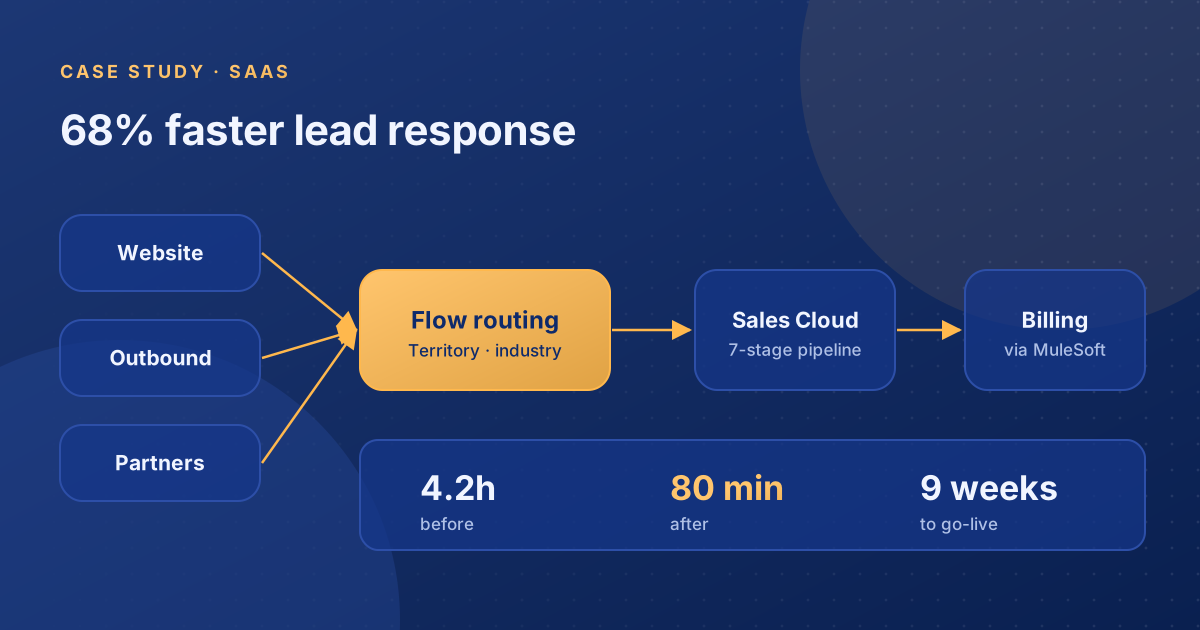
We implemented Salesforce Sales Cloud with lead routing built in Flow, a seven-stage pipeline with exit criteria, and a MuleSoft integration that sends closed deal details straight to the billing platform. Leads from the website, outbound campaigns and partners are now assigned by territory and industry within seconds.
This Salesforce implementation case study covers a software company that had outgrown spreadsheets. Its sales team had tripled in size, but leads still arrived in a shared inbox and waited for a manager to forward them. We rebuilt the sales process on Sales Cloud, automated lead routing and connected Salesforce to billing, all in nine weeks. Below is what we found, what we built and what changed.
Why Leads Were Going Cold
The company sells project management software to mid-sized professional services firms. At any one time it had around 300 open leads spread across Google Sheets, a free HubSpot account and several inboxes.
A new website lead would land in a shared inbox, sit there for hours, then get forwarded to whichever rep the sales manager thought of first. If the manager was in a customer meeting, the lead might wait half a day. In a competitive market, that was often long enough to lose the deal.
There were two longer-term problems. The head of sales could not produce a forecast anyone trusted, because every rep used the pipeline differently. Finance had no view of closed deals until a rep emailed them, and each invoice was then created by hand.
How We Designed the Sales Process First
We spent the first three weeks on discovery and design rather than configuration. We sat with sales leadership, three frontline reps and the finance manager to map how deals actually moved through the business, not how the organisation chart said they should.
That work produced three decisions that shaped the build:
- One pipeline with clear exit criteria. Seven stages, each with the fields a rep must complete before moving a deal on. This made pipeline data trustworthy from the first day.
- Routing by territory and industry. The team already specialised informally. Making it explicit meant every lead had an obvious owner.
- Finance as a system user, not an email recipient. Closed deal data needed to reach billing without anyone retyping it.
What We Built in Salesforce
Automated lead routing with Flow
A record-triggered flow reads each new lead's source, industry and company size, assigns it to the right rep, creates a follow-up task and sends an alert. Routing that used to take hours now takes under 90 seconds.
A structured Sales Cloud pipeline
The seven-stage pipeline uses validation rules and path guidance, so reps see what is needed at each stage. Managers get dashboards showing deals by stage, age and owner.
Billing integration with MuleSoft
When a rep marks an opportunity Closed Won and enters the contract value and billing terms, MuleSoft sends those details to the billing platform in real time. There is no email and no spreadsheet in between. Our Salesforce integration guide explains when middleware like this is worth it.
Problems We Had to Solve Along the Way
Data migration was the messiest part. Three years of leads and contacts were split across HubSpot, spreadsheets and an export from a marketing tool the company no longer used. We deduplicated everything before it reached Salesforce, dropped records with no activity in 18 months and merged duplicates by email domain.
Adoption was the other risk. Several senior reps had their own systems and were sceptical. We ran short, role-specific training rather than one all-hands demo, and set each rep's default views to show only their own deals. Two weeks after go-live, more than 90% of users were logging in daily.
What Changed After Go-Live
Within 60 days, average lead response time fell from 4.2 hours to under 80 minutes. The head of sales ran the first reliable weekly forecast in week three. Finance stopped chasing reps for deal details.
Six months later, when the company raised its Series B, the investor cited the clean pipeline data and documented sales process as part of its confidence in the business.
Lessons for Similar Projects
- Design before you configure. Three weeks of discovery saved far more time in rework.
- Clean data before migration, not after. Importing duplicates into a new CRM just moves the problem.
- Make the system easier than the workaround. Reps adopted Salesforce once it showed them their own work more clearly than their spreadsheets did.
Planning a similar move? Read our Salesforce implementation checklist, or talk to us about a scoped discovery phase.
Services Delivered
Frequently Asked Questions
How long does a Salesforce implementation take for a SaaS company?
This project took nine weeks from kickoff to go-live, including three weeks of discovery and design. That is typical for a Sales Cloud implementation with one integration and a data migration. Projects with several integrations, multiple clouds or complex security usually take longer, often three to six months.
How does automated lead routing work in Salesforce?
A record-triggered flow runs when a new lead is created. It reads fields such as lead source, industry and company size, assigns the lead to the right rep or queue, creates a follow-up task and sends an alert. In this project, routing time fell from hours to under 90 seconds.
Why connect Salesforce to a billing system?
Without an integration, finance relies on reps to email closed deal details, which is slow and error-prone. Sending contract value and billing terms from Salesforce to billing when a deal closes removes retyping, speeds up invoicing and gives finance a reliable view of revenue as it is won.
How do you get sales reps to adopt a new CRM?
Make Salesforce easier than the workaround. We ran short, role-specific training, set each rep's default views to show only their own deals, and made sure dashboards answered questions reps actually asked. More than 90% of users were logging in daily within two weeks of go-live.
Facing a similar challenge?
Book a free 45-minute discovery call. We will look at your current setup and tell you honestly what we think needs to change.
Book a Free Call