Salesforce AIforce and MCP Explained for CIOs
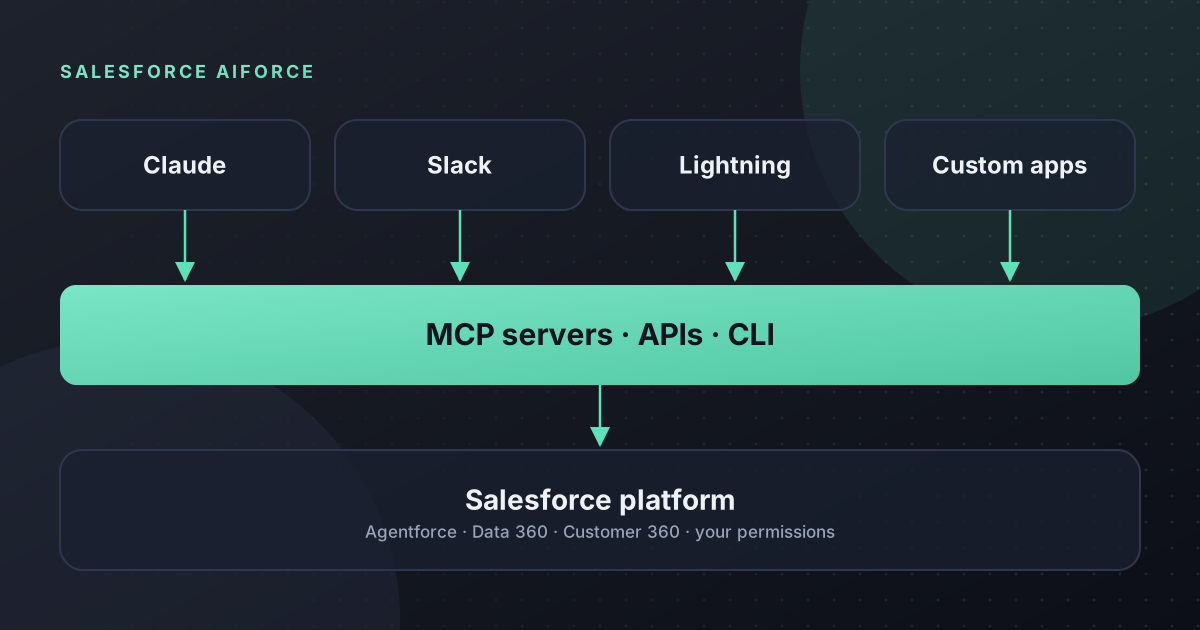
Salesforce AIforce is the company's approach to making its whole platform usable from other tools, including AI assistants such as Claude, Slack and your own applications. It builds on Headless 360 and relies on the Model Context Protocol (MCP) to let AI agents find and use Salesforce capabilities. For CIOs, this changes how Salesforce fits into your architecture, your security model and your integration budget. This guide explains what AIforce is, how MCP works, and the practical decisions it raises.
What Is Salesforce AIforce
Salesforce describes AIforce as a live interface layer that brings its platform to wherever people and agents already work. Instead of every task starting in the Salesforce user interface, data, workflows and business logic become available to other applications through MCP servers, APIs and command-line tools.
AIforce was announced on 15 September 2026 at Dreamforce. It sits on top of Agentforce, Data 360 and Customer 360.
From Headless 360 to AIforce
Headless 360 was the platform work that made this possible. It exposes Salesforce capabilities as tools that agents can discover and call. In August 2026 Salesforce expanded Headless 360 with a Headless 360 MCP Server in open beta, a generally available Data 360 MCP Server, and more than 100 reusable skills.
Salesforce has since renamed Headless 360 to AIforce, stating that the functionality is unchanged. You will still see the old name in some documentation during the transition.
What MCP Is and Why Salesforce Uses It
The Model Context Protocol is an open standard, first released by Anthropic, for connecting AI assistants to tools and data. An MCP server describes what it can do in a way any compatible AI client understands. The client can then call those capabilities when a user's request needs them.
For Salesforce customers, the benefit is that you do not need a custom integration for each AI tool. One Salesforce MCP server can serve Claude, Slack and other MCP-compatible clients, all within the same security rules.
The Four Parts of AIforce
| Component | Where people use it | Status |
|---|---|---|
| Salesforce in Claude | Inside Claude, starting with 37 prebuilt sales skills | Beta |
| Slackforce | Inside Slack, including interactive Slackforce Surfaces, Slackbot, Slack CRM and Slack Code | Announced; check each feature |
| Agentforce Coworker | An AI teammate inside the Lightning interface | Available now |
| Headless Toolkit | MCP servers, APIs, plugins and skills for your own apps and partner integrations | Mixed; some components in open beta |
What AIforce Means for Your Integration Roadmap
- Your permission model becomes your AI access model. Every AIforce surface respects Salesforce sharing and permissions. An over-shared object is now an AI risk as well as a data risk.
- Some integrations may become unnecessary. Point-to-point integrations built only to copy Salesforce data into another tool could be replaced if that tool can call Salesforce directly over MCP. Review them before renewing.
- API consumption will grow. AI assistants make many small requests. Check your API allocation and monitor usage from the start.
- Data outside Salesforce still matters. Agents need context from ERP, finance and support systems. MuleSoft and Data 360 remain relevant for bringing that together.
- Governance needs a plan. Salesforce's Enterprise AI Harness and AI Control Plane will add central oversight from early fiscal FY28. Until then, you need your own register of AI clients and agents.
A Practical Example of AIforce in Use
Consider a distribution business with sales in Salesforce, orders in an ERP and support in Slack. Today, a sales director who wants a view of a key account opens Salesforce for the pipeline, asks finance for overdue invoices, and scrolls Slack for recent escalations.
With AIforce, the director could ask one question in Claude or Slack. Salesforce data arrives through its MCP server under the director's own permissions. ERP data arrives through an existing MuleSoft integration. The answer brings the three together, and any follow-up task is created in Salesforce with a normal audit trail.
Nothing in that example removes the need for good integration design. It changes where people consume the result. That is why the architecture decisions below matter more than the choice of AI assistant.
What CIOs Should Consider
- Security review of MCP clients. Decide which AI tools are approved to connect, and how access is granted and revoked.
- Beta and open beta status. Several components are not yet generally available. Keep them away from critical processes until they are.
- Skills in the team. Admins and developers will need to understand MCP, agent permissions and AI testing. Plan training now.
- Cost model. Budget for AI assistant licences, Salesforce add-ons and extra API usage together, not separately.
Common Mistakes With AI Integrations
- Letting teams connect any AI tool they like. Shadow AI connected to your CRM is a data protection problem.
- Using a single integration user for every AI client. It hides who did what and makes auditing difficult.
- Treating AI access as a one-off project. New skills and tools will keep arriving. Review access on a schedule.
How Alu Cloud Consulting Can Help
We help IT teams review their Salesforce architecture for AI: integration inventory, API limits, permission design and a controlled rollout plan for MCP-based tools. Our Salesforce integration guide covers the fundamentals, and our article on AI agent governance covers the control side.
Planning how AI tools will connect to Salesforce? Book an architecture review with our team.
Ready to talk about your Salesforce project?
Every engagement starts with a free discovery call. No pressure, just an honest conversation about where you are and what you are trying to build.
Frequently Asked Questions
What is Salesforce AIforce?
AIforce is Salesforce's interface layer that makes its data, workflows and business logic available wherever people and agents work, including Claude, Slack, Lightning and custom apps. It uses MCP servers, APIs and command-line tools, and it includes Salesforce in Claude, Slackforce, Agentforce Coworker and the Headless Toolkit.
Is Headless 360 the same as AIforce?
Yes. Headless 360 was the platform work that exposed Salesforce capabilities to agents through MCP, APIs and CLI tools. Salesforce has renamed it AIforce and says the functionality is unchanged. You may still see the Headless 360 name in documentation and in the product during the transition.
Does Salesforce support MCP?
Yes. Salesforce offers a Headless 360 MCP Server in open beta and a generally available Data 360 MCP Server. These let MCP-compatible AI assistants discover and call Salesforce capabilities under the connected user's permissions, without a separate custom integration for each AI tool.
Will AIforce increase our Salesforce API usage?
Probably. AI assistants tend to make many small requests as they gather context and take actions. Check your API allocation before a wide rollout, monitor usage from the first pilot, and budget for AI assistant licences, Salesforce add-ons and API consumption together rather than separately.
Does AIforce replace MuleSoft or other integrations?
Not entirely. AIforce can remove the need for some point-to-point integrations that only copy Salesforce data into another tool. Agents still need context from ERP, finance and support systems, so MuleSoft, Data 360 and well-designed integrations remain important for bringing that data together.