
Salesforce solution
Multi Currency for Salesforce
Convert deal amounts, revenue and any currency field into one corporate currency, at the exchange rate that applied on the day. Built natively on Salesforce.
The problem
Why multi-currency reporting goes wrong in Salesforce
Businesses that sell in several currencies usually report in one. A company in Dubai might quote in AED, USD, EUR and SAR, while the board wants revenue in a single currency that does not change every time a rate is updated.
Standard Salesforce multi-currency uses one conversion rate per currency, so updating a rate changes the converted value of historical records. Advanced currency management adds dated exchange rates, but Salesforce only applies them to opportunities, opportunity products, schedules, splits and related reports. They are not used for currency fields on other objects, in forecasting, or in currency formula fields.
The result is usually a spreadsheet maintained by finance and a monthly argument about whose numbers are right. Multi Currency closes that gap inside Salesforce.
The solution
What Multi Currency does
Any object, any currency field
Opportunities are set up by default. Add other standard or custom objects, and choose the amount, date and output fields for each one.
Date-effective rates
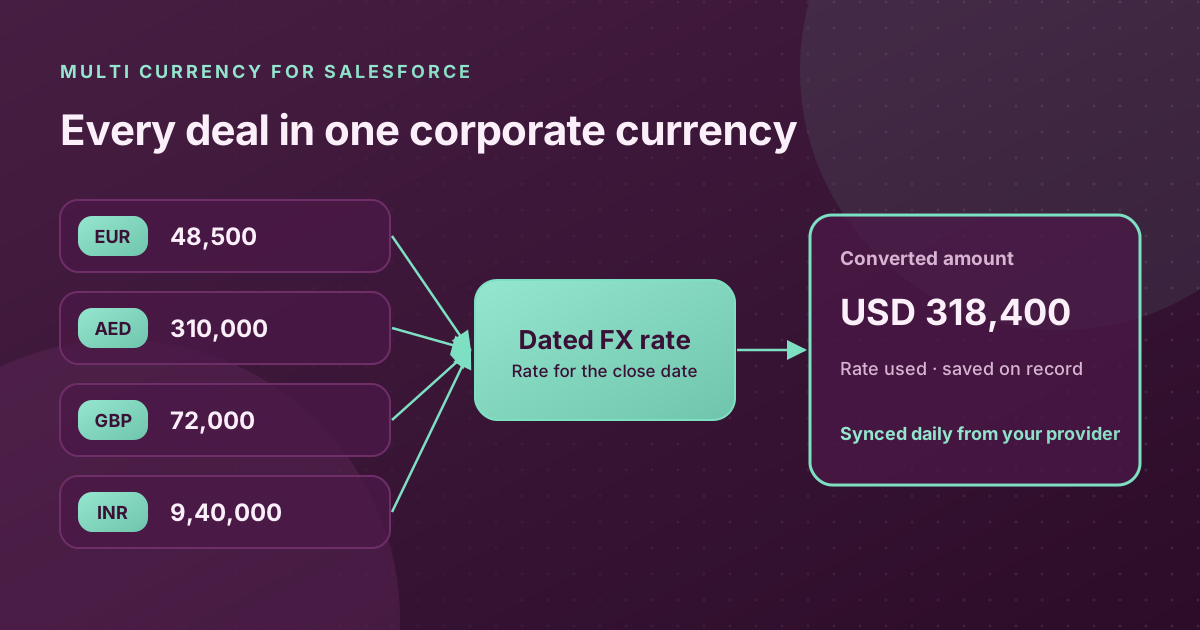
Every rate has a start and end date. A deal is converted at the rate in force on its conversion date, such as the close date, so history stays accurate.
Automatic or manual rates
Sync rates daily, weekly or monthly from the exchange rate provider you choose, or let finance maintain them by hand. Overlapping rate periods are blocked.
Results saved on the record
The converted amount and the rate used are written back to the record, so reports, dashboards and auditors see a fixed value that does not drift.
Runs where you need it
Convert automatically from Flow when a deal closes, preview the conversion on a record page, or call it from Apex in your own automation.
Admin console, no code
Administrators configure objects, fields, corporate currency, tracked currencies and the sync schedule from Lightning screens inside Salesforce.
How it works
Three steps from setup to converted revenue
- 01
Configure
Pick the objects to convert, the source amount and date fields, where to store the result, and your corporate currency.
- 02
Choose your rates
Connect an exchange rate provider and a sync schedule, or enter rates manually. You can also use Salesforce's own dated exchange rates.
- 03
Convert
Records convert automatically through Flow, or on demand from the record page. Each result shows the amount, both currencies and the rate applied.
Who it is for
- Sales teams that quote in several currencies but report revenue in one.
- Finance teams that need historical figures to stay fixed after rates change.
- Organisations converting currency on custom objects, where dated rates do not apply.
- Groups operating across the UAE, GCC, India and Europe with a single reporting currency.
How your data is handled
- Only currency codes are sent to the rate provider. No amounts, record IDs or customer details leave Salesforce.
- All connections use encrypted HTTPS.
- Conversions respect each user's sharing rules and field permissions.
- Built with Apex, Lightning Web Components and custom metadata, with access controlled by a dedicated permission set.
Frequently Asked Questions
What does Multi Currency do in Salesforce?
Multi Currency converts deal amounts, revenue figures or any currency field into your single corporate currency. It uses exchange rates that are either synced automatically from an external rate provider or managed manually, and saves the converted amount and the rate used on the record.
How is this different from standard Salesforce dated exchange rates?
Salesforce's advanced currency management applies dated exchange rates to opportunities and a few related objects, but not to currency fields on other objects or currency formula fields. Multi Currency can be configured for any object and field, and stores the converted result so it does not change later.
Where do the exchange rates come from?
You choose. Rates can be synced daily, weekly or monthly from an exchange rate provider you configure, or maintained manually by your finance team. Each rate has a start and end date, so a deal is always converted at the rate in force on its conversion date.
Is any customer data sent to the rate provider?
No. The only data sent to the rate provider is your corporate currency code and the list of currency codes you track. No record IDs, amounts, customer names or user details leave Salesforce. All communication uses encrypted HTTPS connections.
Does Multi Currency respect Salesforce permissions?
Yes. Conversions run with the user's sharing rules and check object and field permissions before reading or writing any value. If a user cannot read the source amount or update the output fields, the conversion stops and returns a clear message instead of changing the record.
See Multi Currency in your org
Tell us which currencies you trade in and how you report. We will show you the conversion running on your own objects and talk through installation.
Request a Demo