
Salesforce in Claude and How Sales Teams Can Use It
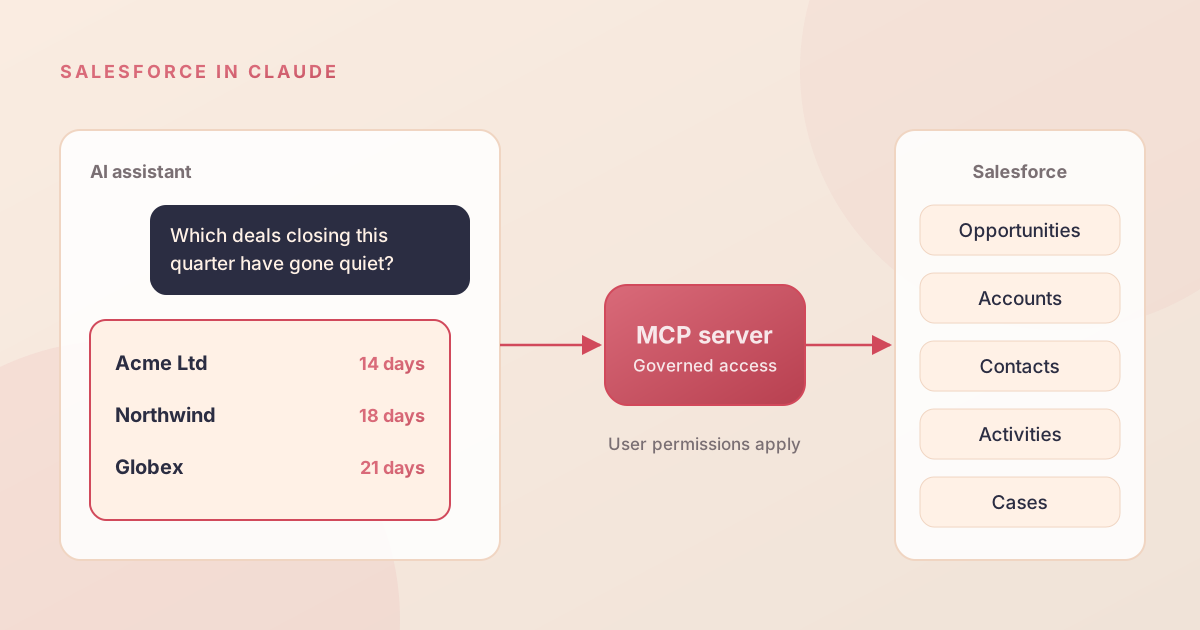
Salesforce in Claude is a plugin that connects Claude, Anthropic's AI assistant, to your live Salesforce data. Sellers can ask about their pipeline, prepare for meetings and update records from a chat conversation instead of clicking through Salesforce screens. It is part of the Claudeforce partnership announced in August 2026 and is currently in beta. This article explains how it works, three sales use cases worth piloting, and the checks to make before you give it to a team.
What Is Salesforce in Claude
According to the Claudeforce announcement, Salesforce in Claude launches with 37 prebuilt sales skills. A skill is a packaged capability, such as summarising a pipeline or drafting a follow-up, that Claude can use against your Salesforce data. Salesforce says more skills for analytics, service, marketing, commerce and specific industries will follow, starting in late 2026.
It is one part of AIforce, Salesforce's programme for bringing its platform to other interfaces. Deloitte, GitLab and Legora took part in the pilot.
Why It Matters for Sales Teams
Sellers spend a large share of their week on admin: finding information, updating fields and writing follow-ups. Much of that work means switching between tabs and reports. If a seller can ask one question and get a reliable answer, the time saved goes back into customer conversations.
There is also a data quality benefit. When updating Salesforce is as easy as telling Claude what happened on a call, records are more likely to be kept up to date.
Three Sales Use Cases Worth Piloting
Pipeline reviews in plain English
A sales manager asks: "Which deals over 50,000 closing this quarter have had no activity for two weeks?" Claude queries Salesforce using that manager's own access and returns a short list with suggested next steps. There is no report to build and no export to a spreadsheet.
Account preparation before a meeting
Before a client call, a seller asks for a one-page brief covering open opportunities, recent support cases, key contacts and the last few touchpoints. Pulling that together by hand can take 20 minutes across several tabs. In Claude it is a single request.
Follow-ups that update the CRM
After the call, the seller asks Claude to draft the follow-up email, log a next step and move the opportunity stage. Salesforce says the skills can take governed actions as well as read data, so the update lands in Salesforce rather than staying in a chat window.
How Salesforce in Claude Works
The connection uses the Model Context Protocol (MCP), an open standard for connecting AI assistants to tools and data. Salesforce provides an MCP server that exposes its data, workflows and actions. Claude calls it when a skill needs Salesforce information.
Two points matter for security teams:
- Permissions carry across. Claude sees what the signed-in user can see in Salesforce, and nothing more.
- Actions are governed. Updates go through Salesforce's normal validation and security controls.
For a deeper look at the architecture, read our guide to AIforce and MCP for CIOs.
What to Consider Before a Pilot
- Beta status. Features and terms can change. Keep it away from regulated or high-risk processes until general availability.
- Licensing and usage. You will need Claude licences as well as Salesforce. Confirm with both vendors how usage is charged before scaling up.
- Sharing model. If users can see more than they should in Salesforce, they will be able to ask Claude about it too.
- API limits. AI assistants make many small calls. Check your org's API allocation.
How to Run a Four-Week Pilot
- Choose five to ten sellers who already keep their records up to date.
- Review their access and fix any over-sharing first.
- Enable two or three skills that match the use cases above. Ignore the rest for now.
- Measure a baseline, such as time spent on meeting prep and admin, before the pilot starts.
- Review weekly for accuracy problems, unexpected actions and user feedback.
Common Mistakes With AI Sales Assistants
- Rolling out to the whole team at once. Problems are easier to fix with ten users than with a hundred.
- Assuming bad data will be ignored. Claude summarises what is in the record, including out-of-date information.
- No feedback loop. Without a clear way to report wrong answers, users quietly stop using the tool.
How Alu Cloud Consulting Can Help
We help sales teams set up Salesforce AI pilots with the right access controls, a clean data set and measures that show whether the tool is paying off. If you are unsure whether your org is ready, start with a Salesforce health check.
Want to test Salesforce in Claude with your sales team? Ask us for a pilot plan.
Ready to talk about your Salesforce project?
Every engagement starts with a free discovery call. No pressure, just an honest conversation about where you are and what you are trying to build.
Frequently Asked Questions
What is Salesforce in Claude?
Salesforce in Claude is a plugin that connects Anthropic's Claude to your live Salesforce data through an MCP server. It launched with 37 prebuilt sales skills that let sellers review pipeline, prepare for meetings and update records from a chat conversation. It is part of the Claudeforce partnership and Salesforce's wider AIforce programme.
Is Salesforce in Claude generally available?
Not yet. It was tested with pilot customers including Deloitte, GitLab and Legora, and moved into beta in September 2026. Salesforce plans further skills for analytics, service, marketing, commerce and industries from late 2026. Keep it away from regulated or high-risk processes until it reaches general availability.
Can Claude see all of our Salesforce data?
No. Salesforce in Claude respects each user's existing Salesforce permissions and sharing rules, so Claude can only see and change what that user can. This makes your permission model more important than ever. Review access before a pilot, because over-shared records will surface in Claude's answers.
What is MCP in Salesforce in Claude?
MCP, the Model Context Protocol, is an open standard for connecting AI assistants to tools and data. Salesforce provides an MCP server that describes its data, workflows and actions. Claude calls that server when a skill needs Salesforce information, so no custom integration is needed.
How should we pilot Salesforce in Claude?
Start with five to ten sellers who keep good records. Review their access, enable two or three skills that match clear use cases, and measure time spent on meeting prep and admin before and after. Run the pilot for four weeks with a weekly review of accuracy and user feedback.