Salesforce Winter '27 Release Guide for Admins
The Salesforce Winter '27 release is being applied to production orgs in waves, with the last ones in early October 2026. Every org is upgraded automatically, so you cannot skip it or choose your own date. What you can do is test the changes that affect your users before they arrive. This guide covers when Winter '27 reaches your org, the Flow Builder, Agentforce and security updates that matter most, and a five-step checklist for admins.
When Winter '27 Reaches Your Org
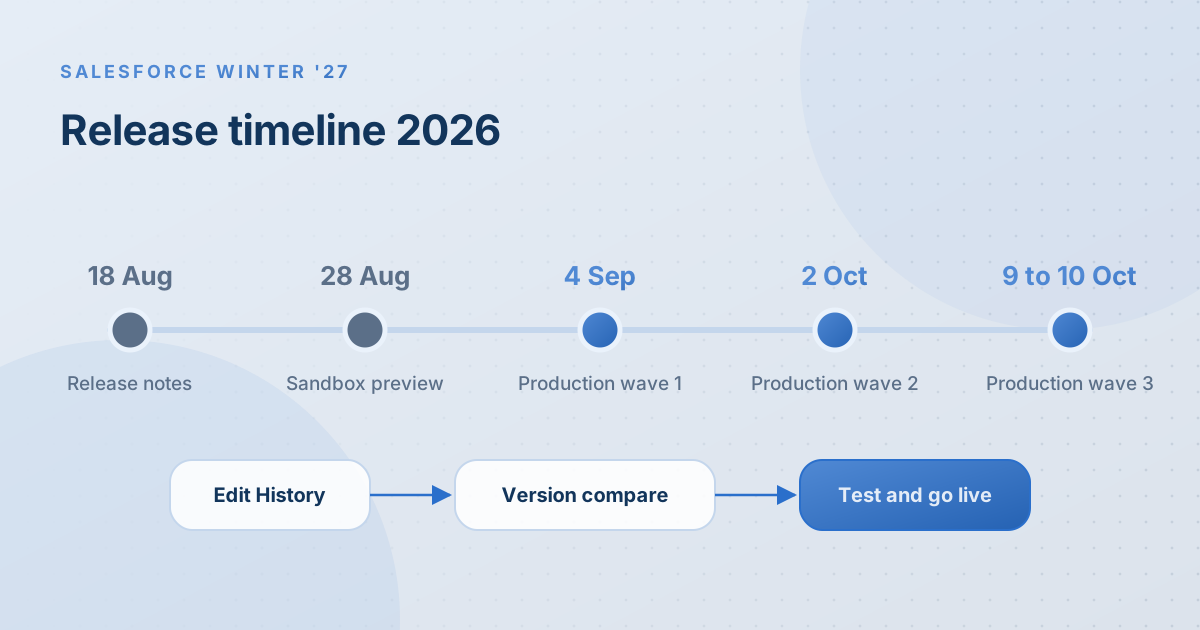
Salesforce published the Winter '27 release notes in mid-August 2026, and preview sandboxes were upgraded at the end of that month. Production upgrades followed in three waves:
- 4 September 2026: first production wave
- 2 October 2026: second production wave
- 9 and 10 October 2026: final production wave, along with non-preview sandboxes
Your date depends on your instance. Check the Salesforce Trust maintenance calendar and search for your instance name, which you can find in Setup under Company Information. Upgrade windows are scheduled in US time. For teams in the UAE or India, that usually means the change is live when you start work the next morning.
Why the Winter '27 Release Matters for Your Business
Most Salesforce releases pass without drama. The problems come from the small number of changes that touch your automation or your users' daily screens. A flow that behaves slightly differently, or a release update enforced without anyone reviewing it, can stop lead routing or case assignment on a Monday morning.
A few hours of testing before your upgrade date is far cheaper than a day of broken processes afterwards.
Winter '27 Flow Builder Updates
Flow Builder gets a set of practical improvements in this release. None of them change how existing flows run, but several make flows easier to maintain. Full details are in the official Winter '27 release notes.
Edit History and clearer version comparison
Edit History lets you track changes to a flow over time. Version comparison is also easier to read. Element names in the comparison table now open a side panel with the full change details, and versions in the drop-down lists appear in a logical order. For teams where several admins edit the same flows, this makes it much quicker to answer the question "who changed this, and when?"
Grouping, automatic labels and unused resources
You can now group elements to organise large flows, and Flow Builder can generate element labels for you as you build. A new Unused Resources filter shows variables and resources that nothing references, which makes tidying old flows much faster. Decision elements are also easier to navigate and configure.
A denser canvas and the Cosmos theme
Flow Builder picks up Salesforce's Cosmos theme and a denser canvas, so you can see more of a flow on one screen. Expect a short adjustment period for admins who know the old layout well.
Agentforce and Security Updates in Winter '27
Salesforce's release highlights for Winter '27 also include:
- Agentforce Voice extended to digital and mobile channels.
- A single front-door agent powered by subagents, so customers talk to one agent that hands work to specialist agents behind the scenes.
- Testing at scale improvements for agents, which matter if you are moving an agent from pilot to production.
- Field-level encryption analysis in Shield, useful for organisations with encryption requirements.
- Data Mask and Seed localisation, which helps teams that build realistic test data in sandboxes.
Availability varies by edition and licence, so check each feature in the release notes before promising it to users.
A Five-Step Winter '27 Upgrade Checklist
- Confirm your upgrade date on Salesforce Trust and put it in your team calendar.
- Review Release Updates in Setup. Filter for anything due or enforced in Winter '27 and test each one in a sandbox.
- Run your five most important flows end to end. Typically lead assignment, opportunity stage automation, case routing, approvals and any flow triggered by an integration.
- Check custom code and managed packages against your sandbox. Ask vendors of critical packages whether they have tested against Winter '27.
- Send users a short note covering only what they will notice. Two or three bullet points are enough.
If you do not have a preview sandbox, refresh one after your production upgrade and test there before your next deployment.
Common Mistakes During Salesforce Releases
- Leaving release updates until they are enforced. They arrive with months of notice. Enforcement day is the worst time to discover one breaks a flow.
- Testing only in production. A sandbox that matches production is the cheapest insurance you have.
- Enabling beta features in production without a rollback plan. Betas can change or be withdrawn.
- Ignoring integrations. Middleware and third-party apps are often the first to notice a platform change.
How Alu Cloud Consulting Can Help
Seasonal releases are where technical debt tends to surface. If your team is short on time, our Salesforce health check reviews release updates, flows and security settings in one pass. For ongoing release management, our managed services cover testing and user communication three times a year. For wider context on this year's AI launches, read our Dreamforce 2026 summary.
Want a second pair of eyes before your upgrade date? Get in touch and we will review your highest-risk automation.
Ready to talk about your Salesforce project?
Every engagement starts with a free discovery call. No pressure, just an honest conversation about where you are and what you are trying to build.
Frequently Asked Questions
When is the Salesforce Winter '27 production upgrade?
Winter '27 was applied to production orgs in three waves: 4 September, 2 October and 9 to 10 October 2026. Your exact date depends on your Salesforce instance. Find your instance name in Setup under Company Information, then check the maintenance calendar on Salesforce Trust.
Can we delay or skip the Winter '27 release?
No. Salesforce upgrades every org automatically, three times a year, and you cannot choose your own date or skip a release. You can decide whether individual sandboxes join the early preview, which gives you time to test changes before production is upgraded.
What are the main Flow Builder changes in Winter '27?
Winter '27 adds Edit History for tracking flow changes, clearer version comparison, element grouping, automatically generated element labels, an Unused Resources filter and easier Decision element configuration. Flow Builder also picks up the Cosmos theme and a denser canvas. These changes improve maintenance without altering how existing flows run.
How should we test a Salesforce release before it goes live?
Use a preview sandbox to review release updates, then run your most important flows end to end, such as lead assignment, case routing and approvals. Check managed packages and integrations, and ask critical vendors whether they have tested. Finish with a short note to users about anything they will notice.
What are Salesforce release updates?
Release updates are changes that Salesforce announces in advance and enforces on a published date, often for security or performance reasons. You can find them in Setup under Release Updates, test them in a sandbox and switch them on early. Reviewing them before enforcement avoids unexpected breaks in automation or integrations.