Agentforce Readiness Checklist for Your First AI Agent
An Agentforce readiness check tells you whether your Salesforce org can support an AI agent before you build one. It matters because most agent projects that stall do so for ordinary reasons: messy data, loose permissions, a vague goal or no plan for handing over to a person. The AI model is rarely the problem. This article sets out the five questions we ask every client before an Agentforce deployment, how to score your answers, and what fixing the gaps usually involves.
What Agentforce Readiness Means
Agentforce is Salesforce's platform for AI agents that can understand a request, decide what to do and take action in your systems. An agent is only as good as the data it reads, the access it is given and the instructions it follows.
Being ready does not mean having a perfect org. It means the specific data, permissions and process your first agent depends on are in good enough shape that the agent will give correct answers and take safe actions.
Why AI Agent Projects Stall Before Go-Live
In our experience, projects that stall usually hit one of these problems during testing:
- The agent gives wrong answers because it reads duplicate or out-of-date records.
- Security review blocks go-live because the agent can see more than it should.
- Nobody can agree whether the pilot worked, because success was never defined.
- Customers get stuck because the route to a human was an afterthought.
Each of these is cheaper to fix before the build than after it.
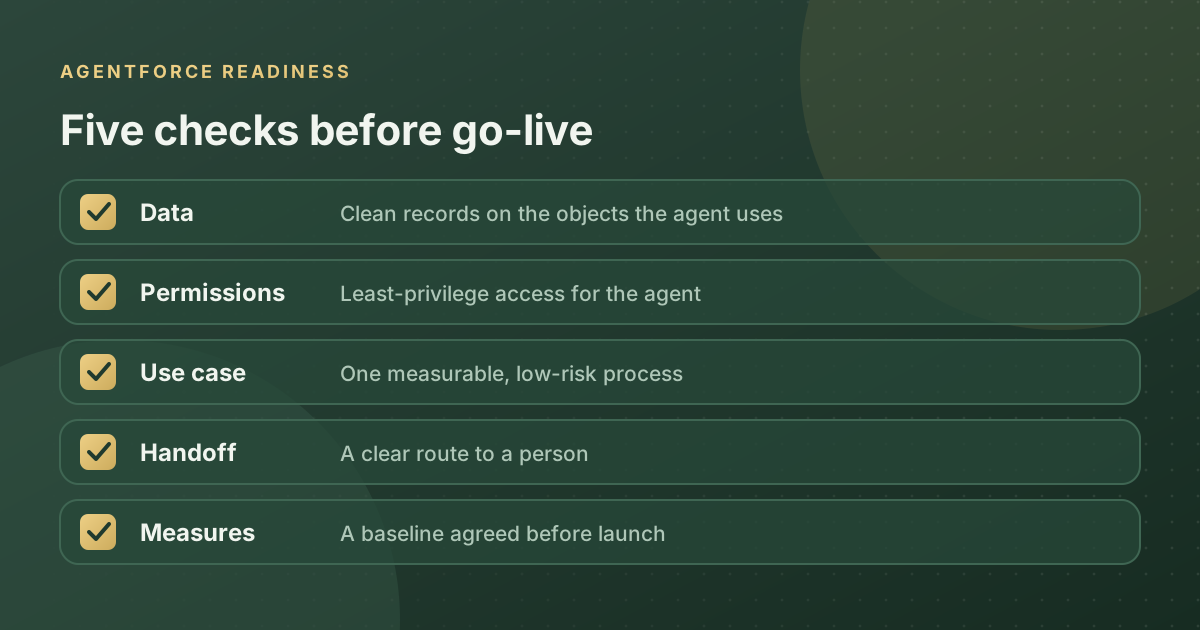
The Five Agentforce Readiness Questions
Is your data clean enough for an agent to act on
An agent acts on whatever it finds. If a customer has three account records, the agent may pick the wrong one. Check the objects your first agent will use for duplicates, empty key fields and records nobody has touched in years. For service agents, check that knowledge articles are current. Our guide to Salesforce data quality and migration covers practical clean-up methods.
Are your permissions and sharing rules correct
Agents and AI assistants respect Salesforce permissions. That only protects you if the permissions are right. Review profiles, permission sets and sharing rules for the data involved, and plan a dedicated permission set for the agent with only the access its job needs.
Do you have one clear, measurable use case
"Use AI in customer service" is an ambition, not a use case. "Answer order status questions on WhatsApp without a person" is a use case. Pick one high-volume, low-risk process. Salesforce's new job-ready Agentforce agents, such as Casey for service and Piper for inbound leads, make this easier because the job is already defined.
What happens when the agent needs a human
Decide the handoff rules before the build. Which topics always go to a person? What context does the agent pass along so the customer does not repeat themselves? How quickly must a person respond? A poor handoff undoes the time the agent saved and damages customer trust.
How will you measure success
Pick one or two numbers and record them before go-live. Good examples are case deflection rate, first response time, lead-to-meeting rate or hours of admin saved per rep. Agree the target with the business owner, and make sure IT agrees it is measurable.
How to Score Your Agentforce Readiness
Give yourself one point for each question you can answer confidently with evidence.
| Score | What it means | Next step |
|---|---|---|
| 5 | Ready for a production pilot | Build, test with real scenarios and launch to a small group |
| 3 or 4 | Close, with specific gaps | Fix the gaps first; this usually takes two to six weeks |
| 2 or fewer | Foundations need work | Start with data and access clean-up, not an agent |
What Fixing the Gaps Usually Involves
- A focused data clean-up on the objects the agent will use, not the whole org.
- An access review and a least-privilege permission set for the agent.
- A knowledge refresh for service agents, removing or updating outdated articles.
- Test scenarios written from real customer conversations, including awkward ones.
- A named business owner who reviews results and approves changes.
Common Readiness Mistakes
- Cleaning the whole org first. It takes too long. Clean what the first agent needs.
- Testing only with ideal questions. Real customers are vague, impatient and inconsistent. Test with that.
- Skipping the security review until the end. Bring security in at the start and the review is quick.
- Measuring activity instead of outcomes. "Conversations handled" means little if customers still call back.
How Alu Cloud Consulting Can Help
We run Agentforce readiness reviews that cover data quality, the permission model and your shortlist of use cases, then give a clear go or no-go with a prioritised fix list. Many clients combine this with a full Salesforce health check. For background on the latest agent launches, see our Dreamforce 2026 summary.
Want an independent view before you build? Book an Agentforce readiness review.
Ready to talk about your Salesforce project?
Every engagement starts with a free discovery call. No pressure, just an honest conversation about where you are and what you are trying to build.
Frequently Asked Questions
How do we know if we are ready for Agentforce?
Check five areas: clean data on the objects your agent will use, correct permissions and sharing, one clear and measurable use case, a defined handoff to a person, and a baseline for your success measure. If you can answer all five with evidence, you are ready for a production pilot.
Why do AI agent projects fail?
Most fail for ordinary reasons rather than problems with the AI model. The common causes are duplicate or outdated data, permissions that give the agent too much access, a vague goal that nobody can measure, and a poor handoff to people. Each is cheaper to fix before the build than after launch.
How long does it take to get ready for Agentforce?
It depends on your starting point. Organisations that meet three or four of the five readiness criteria usually close the gaps in two to six weeks. With fewer, start with a focused data and access clean-up on the objects your first agent needs, rather than trying to fix the whole org.
Do we need perfect data before deploying an AI agent?
No. You need the specific data your first agent depends on to be accurate and current. Clean the objects and knowledge articles that agent will use, remove duplicates and fill key fields. Cleaning the entire org first usually takes too long and delays any measurable result.
What permissions should an Agentforce agent have?
Give each agent a dedicated permission set with only the access its job needs, and never reuse an admin or integration profile. Review sharing rules for the records involved. This limits risk if the agent misbehaves and makes it much easier to audit what the agent could see and change.